A professional invoice for every Shopify order.
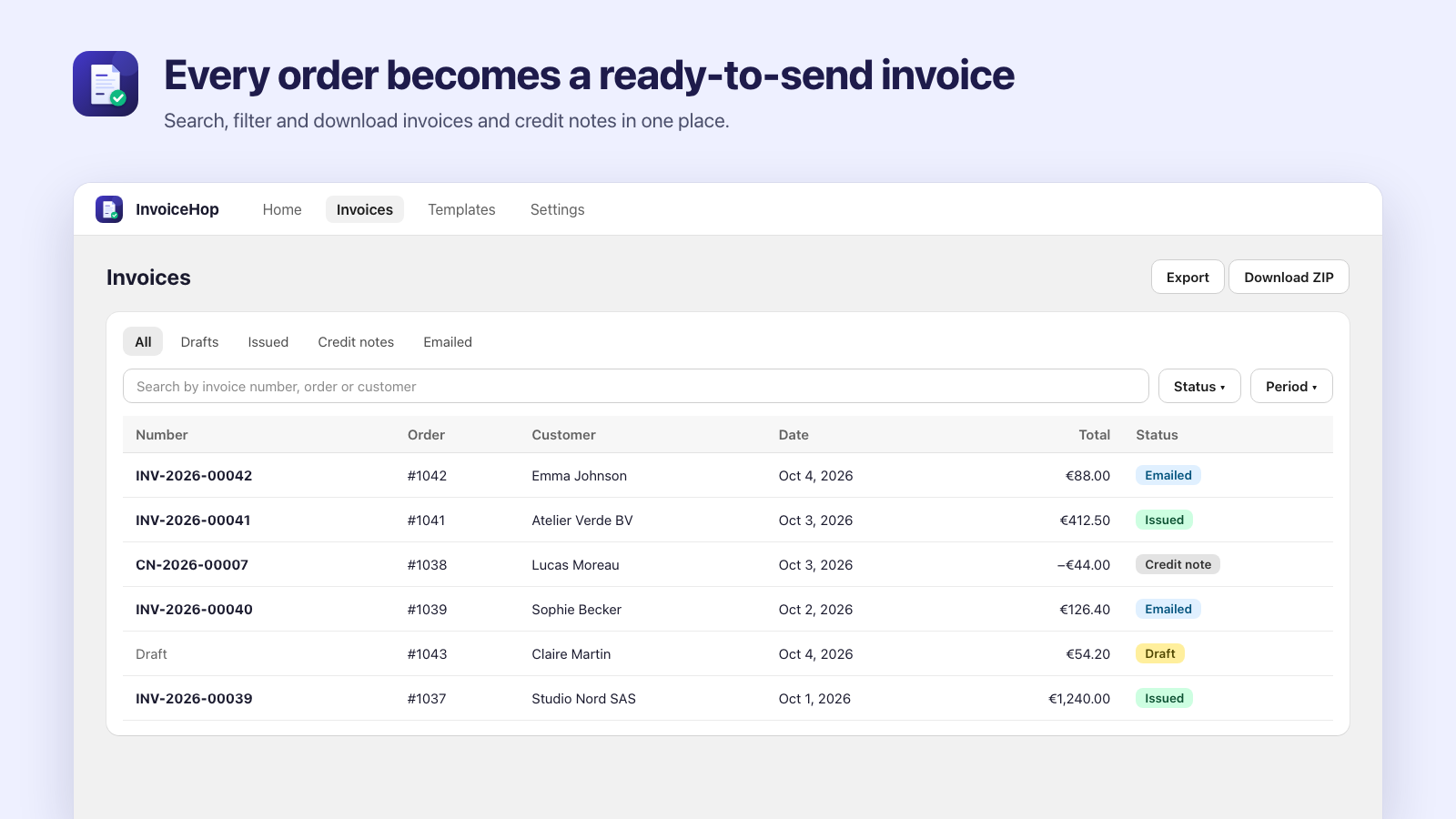
InvoiceHop creates a branded PDF invoice for each order and a credit note whenever an order changes. It goes out through the email service you already use, lands in your cloud backup, and you never type an invoice by hand again.
Free plan with 50 invoices a month, emails included.
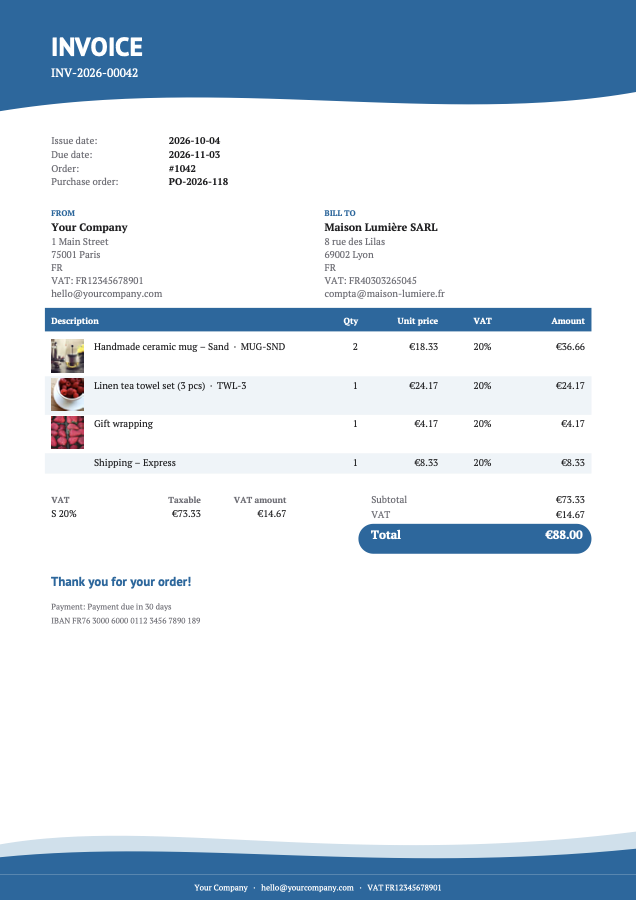
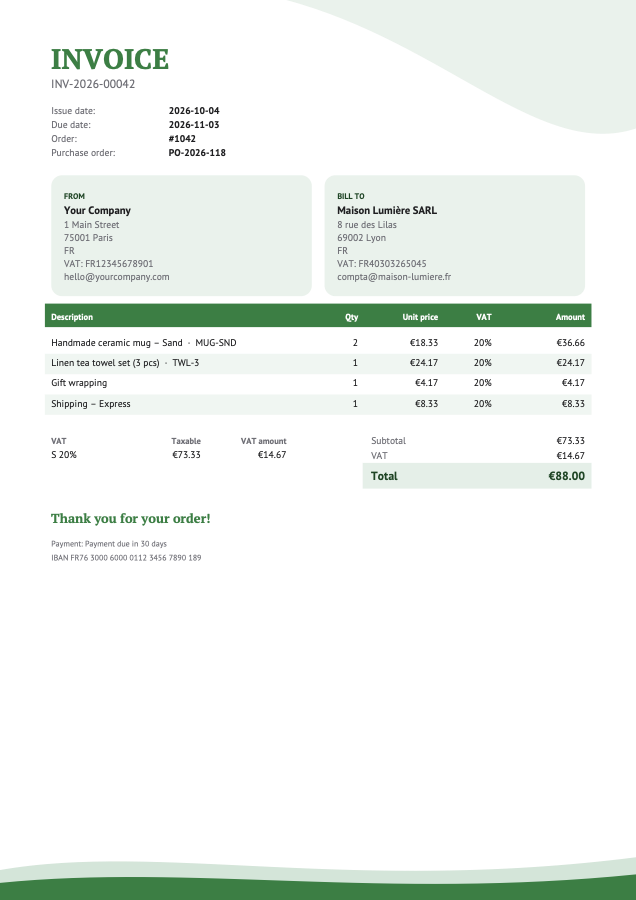
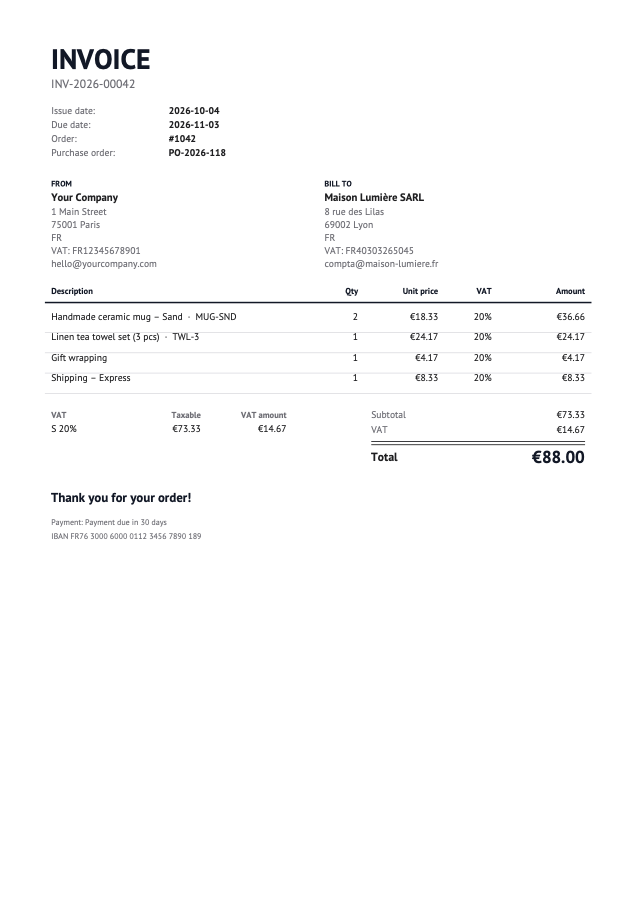
InvoiceHop in 40 seconds
What happens to each order
An order comes in
InvoiceHop builds a draft invoice from it. Drafts keep following the order while you edit it.
The order is paid
The invoice is issued with the next number in your sequence, then frozen. You can also issue on fulfillment or by hand.
The order changes
Refunds, edits and cancellations create a credit note linked to the invoice. The order's payment status is never touched.
Your customer gets it
By email, on the thank-you page or in their account, as a branded PDF.
Everything your invoicing needs
Create
Every document, made for you.
Invoices without lifting a finger
A draft for every order, issued when it's paid, when it's fulfilled or when you click. You choose.
Credit notes handled for you
Refunds, edits and cancellations create a credit note linked to the original invoice.
Numbering without gaps
Your own prefixes and a sequence per year. Numbers are assigned only when an invoice is issued.
Quotes from draft orders
Numbered quotes with an accept-and-pay link. Once paid, the order is invoiced automatically.
Design
Looks like your brand, reads in their language.
Eighteen templates
Including three receipt formats, with your logo, colors, fonts, footer and the wording on each document.
24 languages
From English, French and German to Japanese, Korean and Chinese, or each customer's own language.
A QR code to the order
Customers scan it to follow their order, download the invoice or pay what's due.
Every document you print
Packing slips, gift receipts, delivery notes, returns forms, pro forma and address labels, for one order or fifty at once.
Deliver
In your customers' hands, without a support ticket.
Emails on every plan
Invoices go out with your own subject and message, and replies come back to you.
Your own email service
On Pro: your SMTP server, Brevo or Mailchimp, or an event in Klaviyo, Omnisend or Shopify Flow.
Downloads on your store
From the thank-you page, the order status page and the customer account.
In store with Shopify POS
Staff print, email or issue the invoice right from the POS app.
Keep
Records your accountant will thank you for.
Bulk download, export and reports
Download a month as a ZIP, export to CSV or Excel, and on Pro see sales and VAT by rate and country.
Backups where you want them
On Pro: every issued document saved to Google Drive, Dropbox, OneDrive or Amazon S3.
For consumers and businesses
Business buyers add company, VAT and PO numbers, and Shopify B2B is supported.
Help when you need it
Chat with us from inside the app, or read the step-by-step guide for every setting.
Get paid
Fewer unpaid invoices, less chasing.
Payment reminders
On Pro: polite emails before and after the due date, stopped as soon as Shopify shows the order paid.
Customer statements
On Pro: everything a customer still owes on one PDF, with what's overdue, to download or email.
Commercial invoices
On Pro: customs invoices with HS codes, country of origin and weights for shipments abroad.
Developer API
On Pro: read invoices and credit notes from your own tools, and get a signed webhook when one is issued.
Works with the tools you already use
Invoices go out through your own email service or marketing platform, and every issued document is copied to your cloud storage. Connect them on Pro and Pro Plus, in a couple of clicks.
Invoice emails
Send the PDF from your own domain, or hand it to the automation you already run.
 InvoiceHopBuilt in, every plan
- Your SMTP serverGmail, Outlook, Zoho, SendGrid…
- BrevoFrom your verified domain
- Mailchimp TransactionalFrom your verified domain
 KlaviyoYour flow sends it
 OmnisendYour automation sends it
- Shopify FlowAny app connected to Flow
Cloud backups
Every issued invoice and credit note, saved as a PDF in a folder you own.
- Google DriveSaved automatically
- DropboxSaved automatically
 OneDriveSaved automatically
 Amazon S3Saved automatically
Inside Shopify
InvoiceHop shows up where you and your customers already are.
- Order pages
- Bulk print menu
- Shopify POS
- Thank-you page
- Order status page
- Customer accounts
- Draft orders
- Shopify B2B
Inside the app
E-invoicing built in, for when you need it
Selling to businesses in France or Belgium, or to customers who ask for e-invoices? On Pro and Pro Plus, every invoice also carries Factur-X, XRechnung and Peppol XML. Nothing changes for your other orders.
<rsm:CrossIndustryInvoice><rsm:ExchangedDocument><ram:ID>INV-2026-00042</ram:ID>BT-1<ram:TypeCode>380</ram:TypeCode></rsm:ExchangedDocument><ram:BuyerTradeParty><ram:Name>Maison Lumière SARL</ram:Name><ram:ID schemeID="VA">FR40303265045</ram:ID>BT-48</ram:BuyerTradeParty><ram:BuyerOrderReferencedDocument><ram:IssuerAssignedID>PO-2026-118</ram:IssuerAssignedID>BT-13</ram:BuyerOrderReferencedDocument><ram:GrandTotalAmount>88.00</ram:GrandTotalAmount>BT-112</rsm:CrossIndustryInvoice>
Factur-X, XRechnung and Peppol UBL
Files that follow the European invoice standard EN 16931, checked in test mode the way a network would check them. Buyer references for German public buyers.
EU VAT that holds up
Buyer VAT numbers are checked in the EU VIES database. Reverse charge applies only when the number is valid and the goods ship to another EU country.
French legal mentions
SIREN, RCS, share capital, legal form, late payment penalties and the €40 recovery fee print on every B2B invoice.
Peppol IDs for Belgian buyers
Buyers can add their Peppol ID on the cart, and InvoiceHop works one out from VAT or company numbers when it can.
Pricing
Free has everything you need to invoice, with emails sent by InvoiceHop. Pro and Pro Plus add your own email service, cloud backups, Shopify Flow, e-invoicing, payment reminders, reports and the API. Credit notes never count. Billing goes through your Shopify invoice.
Free
$0 / month
50 invoices a month
- Automatic invoices and credit notes
- 18 templates in 24 languages
- Quotes, packing slips, POS
- Gift receipts, returns forms, labels
- Invoice emails and customer downloads
- ZIP, CSV and Excel export
Pro
$10 / month
250 invoices a month
- Everything in Free
- Your own email service, Klaviyo, Omnisend
- Shopify Flow triggers
- Backups to Drive, Dropbox, OneDrive, S3
- Factur-X, XRechnung and Peppol e-invoicing
- EU VAT checks in VIES
- Payment reminders and statements
- Reports, customs invoices and API
Pro Plus
$20 / month
Unlimited invoices
- Everything in Pro
- Priority support
Questions
Can invoices go out through my own email service?
Yes, on Pro and Pro Plus. Send from your own domain through your SMTP server (Gmail, Outlook, Zoho, SendGrid and others), Brevo or Mailchimp Transactional. Or let Klaviyo, Omnisend or Shopify Flow send the email, with a download link to the invoice. On Free, InvoiceHop sends the emails for you.
Where are my invoices backed up?
Every invoice is stored in InvoiceHop. On Pro and Pro Plus, each issued document is also saved to your Google Drive, Dropbox, OneDrive or Amazon S3 bucket, and invoices issued before you connected can be copied over too.
What happens when an order changes after the invoice is issued?
Issued invoices are never edited. InvoiceHop creates a credit note for the change and, for edits, a new invoice, all linked together. Credit notes don't count toward your monthly limit.
Can customers download their own invoices?
Yes. Add the download block to the thank-you page and the order status page, or put the download button in your order confirmation email.
Does it work with Shopify B2B companies?
Yes. InvoiceHop reads the company and tax ID from Shopify B2B. Without B2B, buyers can enter their details in the cart block, and you can correct them from the order page.
Does it work with Shopify POS?
Yes. In-store sales are invoiced like online orders. Activate InvoiceHop in your POS apps, and staff get an Invoice button on the order and after each sale to print, email or issue the invoice, or add a business buyer's details first.
Do I need e-invoicing to use InvoiceHop?
No. Most stores only need PDF invoices, and that's what InvoiceHop does out of the box. E-invoicing comes with the Pro and Pro Plus plans, for when your customers or your country ask for it.
Does InvoiceHop send e-invoices over Peppol or to a French platform?
InvoiceHop creates the Factur-X and Peppol UBL files and checks them in test mode. You connect your own e-invoicing provider, which does the sending. Sending through providers is being added one provider at a time, and the app tells you plainly when a provider isn't live yet.
Which languages can my invoices use?
Documents can be printed in 24 languages: English, French, German, Spanish, Italian, Dutch, Portuguese, Polish, Arabic, Swedish, Danish, Norwegian, Finnish, Czech, Slovak, Romanian, Hungarian, Greek, Bulgarian, Croatian, Turkish, Japanese, Korean or Chinese. You can also print each customer's documents in the language they shopped in. The app itself is available in 14 languages.
What happens to my invoices if I uninstall?
Shopify asks apps to delete store data 48 hours after uninstalling, so export your invoices first (CSV, Excel, ZIP or Google Drive). Keep them for as long as your local law requires.

Issue your first invoice today
Install InvoiceHop, add your company details, and your next order gets an invoice.
Install on Shopify