 InvoiceHop
Packing slips and printing
Print invoices and packing slips from Shopify's order pages, one order or fifty at a time.
A packing slip lists what to pack for an order, without prices: the items and quantities with a Packed box to tick, the shipping address, the shipping method and the order note. Gift cards and digital products are left out. It's always built from the order as it is now, and it never gets a number.
From Shopify's order page
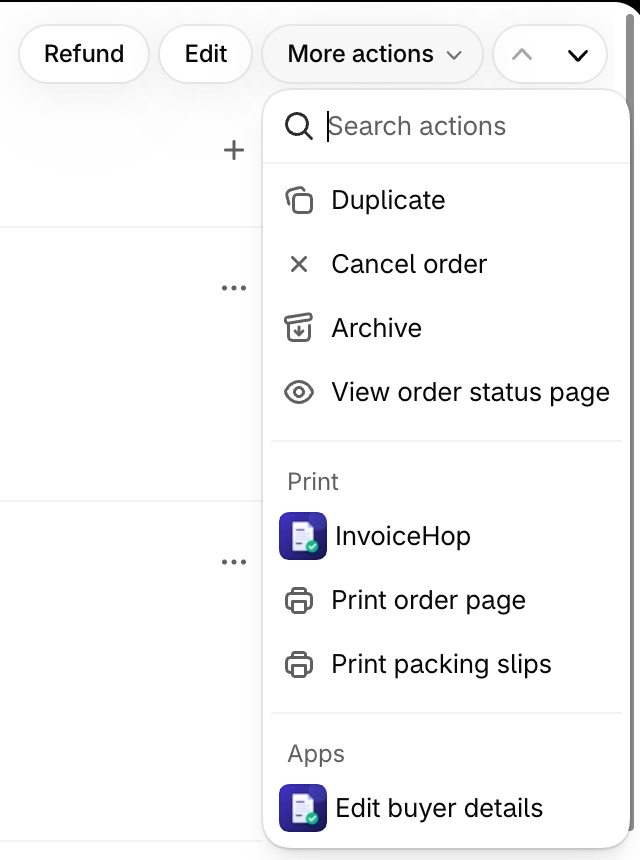
- Open the order and click More actions.
- Under Print, choose InvoiceHop.
- Tick Invoice, Packing slip or both. You see a preview right away.
- Click Print.
Several orders at once
On Shopify's Orders page, select up to 50 orders, click Print in the bar that appears and choose InvoiceHop. You get one PDF: each order's invoice, followed by its packing slip.
From InvoiceHop
- On an invoice's page, click Print packing slip.
- On the Invoices page, select documents and choose Packing slips (PDF) in the bulk menu: one slip per order, in one PDF.
Good to know
- Printing never creates, issues or emails anything. The invoice printed is the one your customer gets; a draft is printed with a DRAFT watermark.
- Orders placed before you installed InvoiceHop have no invoice in the app, so only their packing slip is printed.
- Packing slips have their own tab in Templates. Until you pick one, they use your invoice design.